
 For Owners
 For Sales
 For Production
 For Finance
 Presentations
 Shops
Shops
 Product Mockups
 Client Portals
 Product Search
 CRM
CRM
 Decorator Matrix
 Suppliers
 Navigation & Dashboards
 Production Management
 Reports & Analytics
 commonsku Payments
 Essentials
 Advanced
 Enterprise
 Customer Stories
 Events
 Blog
Blog
 eBooks
 skucast (Podcast)
 Ask skucast
 Webinars
 ROI Calculator
 FAQ
FAQ
commonsku Payments for Distributors: 5 Reasons to Start Using It Today
You already know the payment came in. You just spent eleven minutes proving it to three different systems: the processor that took the money, commonsku where the invoice was issued, and your accounting software, which you now have to check for accuracy. Each of those systems is doing exactly what it was built to do, and now you’re responsible for making sure that they all tell the same story.
This article is a deep dive into what’s possible when Payments are brought directly into commonsku, and helps you handle just that.
At a Glance
- Collect payments upfront on deposits and sales orders.
- Take payments at a Shops Checkout.
- Reconcile daily in QuickBooks or Xero.
- Issue a refund that keeps your books and tax accurate.
- Pass a processing fee to your client.
Introducing commonsku Payments: A New Way to Check Your Balance
A single payment does more than create a single record: it causes chaos. This is because that payment has now created a record where any outstanding money must now arrive in either your processor, commonsku itself, or an accounting system that’s lost track. This isn’t a failure of any individual system; in fact, they’re doing what they were assigned to.
The difficulty is that gap in communication, and that is exactly what commonsku Payments solves.
commonsku Payments is a payments processor that allows distributors to accept credit card and ACH payments and keep their books in sync without having to move between different systems. It automates the reconciliation and tax work that used to be done separately, by folding payment processing directly into commonsku itself.
→ Learn more: commonsku Payments
What This Means For Your Finance Team
Finance teams spend hours each week matching payments to invoices by hand. And every time a refund goes out, they have to adjust taxes in Avalara manually, too. commonsku Payments can help those teams gain control of that process.
Within commonsku Payments, there is an embedded dashboard showing transactions, fees, and payouts right inside commonsku. The purpose of this dashboard is to bring a layer of visibility and a dedicated view to track payments, including a place to manage disputes.
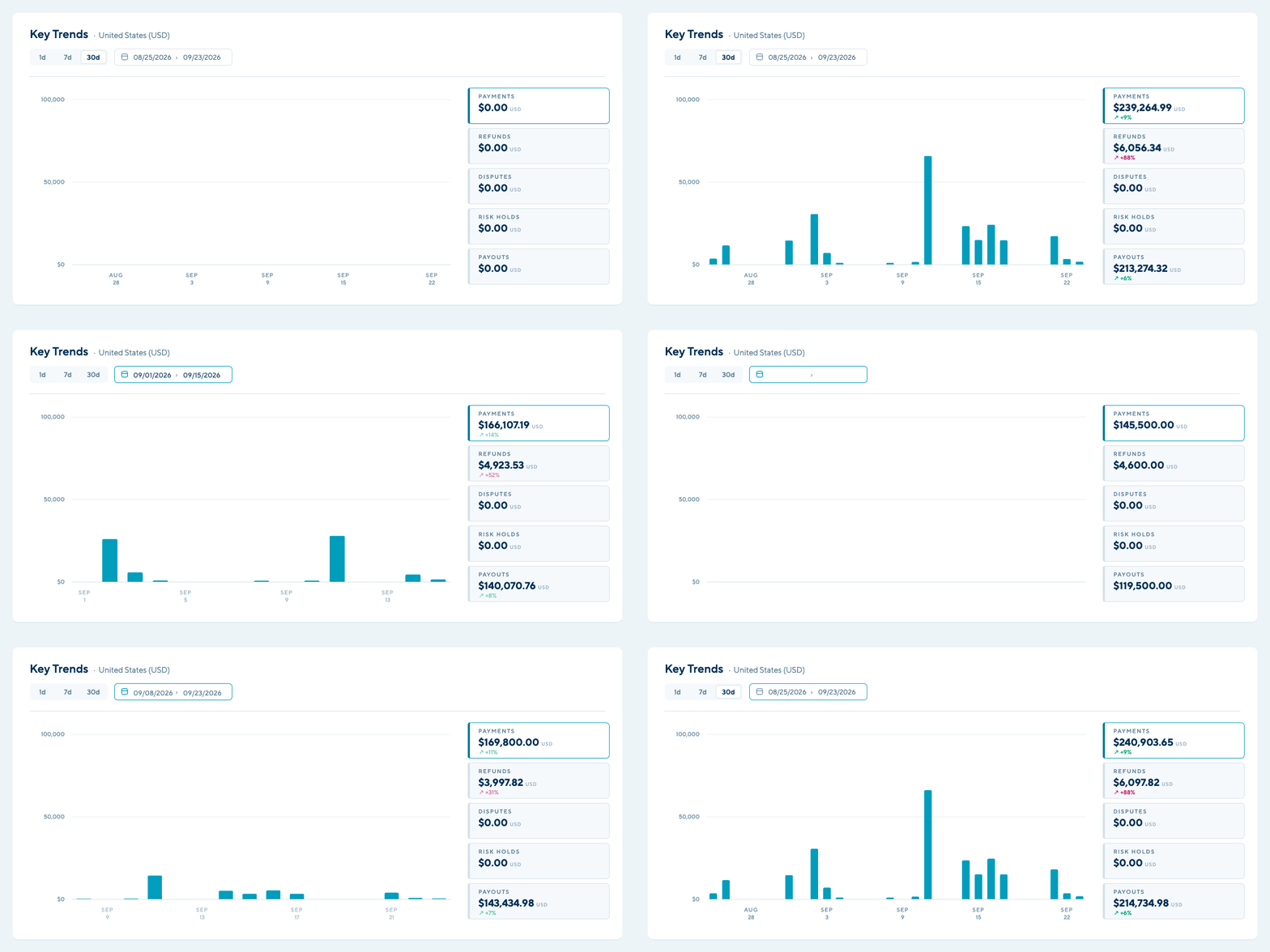
Instead of jumping between a processor’s dashboard and an accounting system to piece together what came in, those teams now have that transparency right inside commonsku.
5 Ways You Can Start Using commonsku Payments Today
We recognize that switching payment processors can feel like a big change, especially when your team has a process that already works. If you decide to make the switch, here is a list of five ways distributors are using commonsku Payments today:
1. Collect payments upfront on deposits and sales orders
Problem: You invoice in commonsku, but you charge your client in a separate processor. At the same time, you collect your client’s payment details by email or phone, which can put yours and your client’s data at risk.
Solution: Your client can pay by credit card or ACH directly on a Deposit or Sales Order. This process doesn’t change; you just have a better way of keeping track of every transaction in a single view.
The Benefit
Your payments always remain in one place. And with fewer handoffs between systems, comes the reduced risk of losing that payment data.
2. Taking payments at a Shops Checkout
Problem: Shops orders paid through an outside processor must be matched to your books.
Solution: Like usual, your client uses their credit card at their Shops Checkout. From there, these transactions sync, along with other payments, directly into QuickBooks or Xero.
Benefit
Running a Shops Checkout no longer means more administrative work. Instead, that Shop revenue lands directly in your books or in commonsku Payments.

3. Daily Reconciliation in QuickBooks or Xero
Solution: Your gross settlement means a $1000 invoice puts exactly that: $1000 in your account, fees withdrawn separately. Both are then pushed into QuickBooks nightly, and an outstanding invoice is paid automatically when your client pays. In addition, your fees are mapped against a global cost, not product-by-product.
Benefit
Your balance is finally clean, and most importantly, organized. This could give hours back to your finance team.
4. Issuing a refund
Problem: Every refund used to mean a manual update in QuickBooks, including a manual tax adjustment in Avalara. Payments data is sensitive, so this opens the door to potential error.
Solution: You issue the refund in your commonsku Payments portal, and it gets pushed to QuickBooks and Avalara automatically, where refunds are issued in full.
Benefit
Your tax record stays as accurate as it can be, and any manual adjustment is less likely to happen, with less work to readjust.
5. Passing a processing fee to your client
Problem: You want to forward a fee to your client, but you’re unclear as to whether that is allowed in the state or location the purchaser is buying from.
Solution: commonsku checks whether fee forwarding is allowed in your client’s location and the differences between the payment types, whether it is a credit card or a debit card.
Benefit
You recover processing costs with less compliance risk, or potential legal fees.
Payments, With Less Work
Count your steps: The most useful thing you can do with this article takes about ten minutes. The next time someone on your team reconciles a payment, write down every step between the money arriving and the money being fully recorded.
Every step on that list is valid on one condition: every system must agree. The list is not a measure of how well your team works. It is a measure of the distance between your processor and your platform, and it is the most honest number you will get about what your current setup costs you.
If you’re interested in exploring how commonsku Payments can work for you and your business, connect with us:
New to commonsku
See how invoicing, payments, and production connect end to end.
Take the Platform Tour →